
Introduction
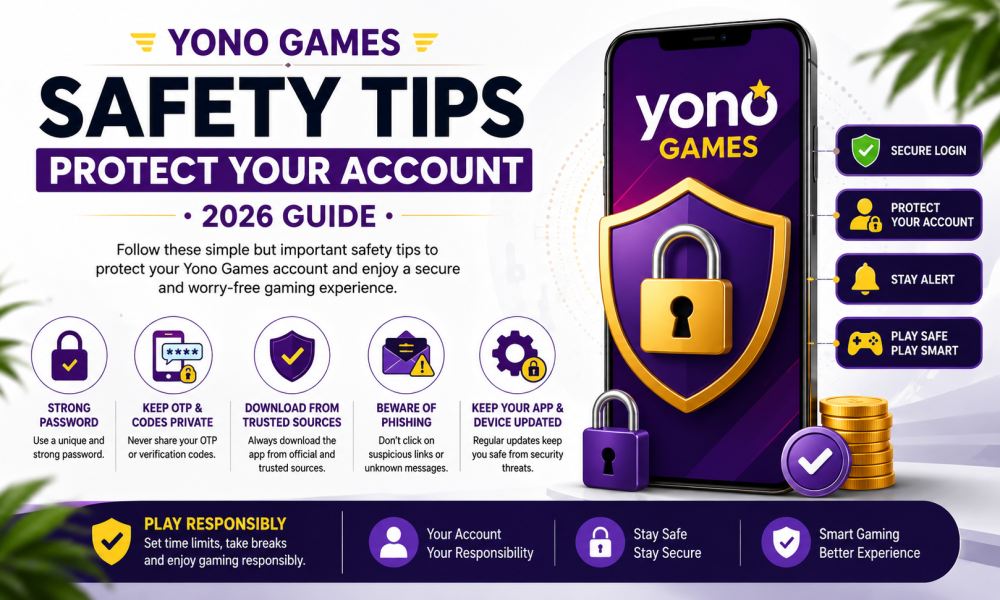
As online gaming continues to grow, keeping your gaming account secure is more important than ever. Whether you are a beginner or a regular user, following good security practices can help protect your personal information, login credentials, and overall gaming experience.
Many account security problems happen because users unknowingly reuse weak passwords, download apps from untrusted sources, or click suspicious links. Fortunately, most of these risks can be reduced by following simple safety habits.
This guide explains practical Yono Games safety tips that can help you keep your account secure. These tips are educational in nature and are useful for anyone who wants to improve their online account security.
Why Account Security Matters
Your gaming account may contain personal information such as your username, email address, settings, and game progress. Protecting your account helps reduce the chances of unauthorized access and keeps your experience safer.
Good security habits can help you:
- Protect your login details.
- Reduce the risk of unauthorized access.
- Keep your personal information private.
- Maintain control of your account.
- Enjoy gaming with greater confidence.
Account security is an ongoing process rather than a one-time task.
Create a Strong Password
A strong password is one of the most important ways to protect any online account.
Good passwords are usually:
- Long enough to be difficult to guess.
- Unique for each account.
- A mix of uppercase letters, lowercase letters, numbers, and symbols.
- Free from obvious personal information such as birthdays or names.
For example, instead of using a simple password, create one that is unique and difficult for others to predict.
Changing your password periodically can also improve account security.
Never Reuse Passwords
Using the same password for multiple websites increases risk.
If one account becomes compromised, the same password could potentially be tried on other accounts.
Instead:
- Create a different password for each important account.
- Consider using a trusted password manager if you have many passwords to remember.
- Avoid writing passwords in easily accessible places.
Unique passwords provide an additional layer of protection.
Enable Two-Factor Authentication (If Available)
Some online platforms offer Two-Factor Authentication (2FA).
When available, this feature adds an extra verification step during login.
Benefits include:
- Additional protection beyond your password.
- Reduced risk if someone learns your password.
- Greater control over account access.
If the platform supports this feature, enabling it is generally considered a good security practice.

How to Build a Winning Mindset in Rummy (Beginner
Download Apps Only From Trusted Sources
Downloading apps from unknown websites can increase security risks.
For better safety:
- Use trusted app stores or the official website when available.
- Avoid modified or unofficial versions.
- Be cautious of links shared through unknown messages or social media.
- Verify the app name and publisher before installing.
Downloading from trusted sources helps reduce the risk of harmful software.
Verify Website Addresses Carefully
Before logging into any account, check the website address.
Look for:
- Correct spelling of the domain name.
- A secure connection (HTTPS).
- No unusual characters or extra words in the address.
Fake websites sometimes imitate real platforms to collect login information.
Taking a few seconds to verify the website can help protect your account.
Protect Your Login Information
Your login credentials should always remain private.
Avoid:
- Sharing passwords with others.
- Sending login details through messages.
- Saving passwords on public computers.
- Using simple passwords that are easy to guess.
Keeping login information confidential is one of the simplest security practices.
Keep Your Device Updated
Software updates often include important security improvements.
Regularly update:
- Your smartphone operating system.
- Security software.
- Browser.
- Gaming application.
Keeping your device updated helps maintain overall security and performance.
Use Screen Lock Protection
Protect your phone or tablet with:
- PIN.
- Password.
- Fingerprint.
- Face recognition.
Screen locks help prevent unauthorized access if your device is lost or misplaced.
Avoid Public Devices
Logging into personal accounts on shared or public devices may increase security risks.
Whenever possible:
- Use your own device.
- Log out completely after every session.
- Avoid saving passwords on shared systems.
Using trusted devices helps protect your personal information.
Build Daily Security Habits
Simple habits can improve long-term security.
Examples include:
- Checking login activity if available.
- Updating passwords when necessary.
- Keeping software current.
- Reviewing account settings periodically.
- Staying informed about common online security threats.
Consistency is one of the best ways to maintain account protection.
Be Aware of Phishing Scams
One of the most common online threats is phishing.
Phishing is when someone pretends to be a trusted company or website to trick users into revealing their login credentials or personal information.
These attempts may arrive through:
- Emails
- SMS messages
- Social media messages
- Messaging apps
- Fake websites
Always verify the sender before clicking any links or entering your login information.
Recognize Suspicious Links
Not every link shared online is safe.
Before clicking any link, ask yourself:
- Does the website address look correct?
- Is the message unexpected?
- Is someone creating urgency?
- Is the link coming from an unknown source?
If something feels suspicious, avoid opening it.
Never Share Verification Codes
If you receive a verification code through SMS or email, keep it private.
Never share:
- One-Time Passwords (OTP)
- Verification codes
- Recovery codes
- Authentication codes
Legitimate services generally do not ask you to share these codes with other people.
Keep Your Personal Information Private
Protecting personal information is just as important as protecting your password.
Avoid publicly sharing:
- Email address
- Mobile number
- Passwords
- Verification codes
- Financial information
- Personal identification details
Limiting the information you share online reduces unnecessary risks.
Use Secure Internet Connections
Whenever possible, use a trusted internet connection.
If you need to access your gaming account:
- Prefer your home Wi-Fi or mobile data.
- Be cautious when using public Wi-Fi.
- Avoid logging into important accounts through unsecured networks unless you are using appropriate security measures.
Secure internet connections help reduce exposure to certain online risks.
Keep Your Browser Updated
Your web browser plays an important role in online security.
Regular updates provide:
- Security improvements.
- Better protection against known vulnerabilities.
- Improved browsing performance.
Enable automatic updates whenever possible.
Review App Permissions
Some applications request permissions that may not be necessary.
Periodically review permissions such as:
- Camera
- Microphone
- Contacts
- Storage
- Location
Only allow permissions that are required for the app’s intended functionality.
Log Out From Shared Devices
If you ever sign in on a shared device:
- Log out after finishing.
- Clear saved passwords if necessary.
- Close your browser completely.
This simple habit helps prevent unauthorized access.
Rummy Card Arrangement Tips – Complete Beginner
Monitor Your Account Activity
Regularly reviewing your account activity helps you notice unusual behavior.
Look for:
- Unknown login attempts.
- Unexpected password changes.
- New devices connected to your account.
- Unrecognized account activity.
If something appears unusual, change your password immediately and follow the platform’s account recovery process if needed.
Stay Updated About Security
Online security continues to evolve.
Helpful ways to stay informed include:
- Reading official announcements.
- Following trusted security resources.
- Learning about common online scams.
- Reviewing account settings periodically.
Knowledge is an important part of online safety.
Practice Responsible Gaming
Security also includes maintaining healthy gaming habits.
Helpful suggestions:
- Set reasonable time limits.
- Take regular breaks.
- Balance gaming with work, studies, and family responsibilities.
- If a game offers optional paid features, decide on a spending limit beforehand and stick to it.
- Treat gaming as entertainment rather than a source of guaranteed outcomes.
Responsible habits contribute to a safer and more enjoyable experience.
Build a Weekly Security Routine
Consider following this simple routine:
Monday
Review your password strength.
Tuesday
Check for app updates.
Wednesday
Review device security settings.
Thursday
Check account activity.
Friday
Review app permissions.
Saturday
Update important passwords if needed.
Sunday
Review your overall online security habits.
Small routines help build long-term protection.
Quick Security Checklist
Before every login, remember to:
- Verify the website address.
- Use a strong password.
- Keep verification codes private.
- Avoid suspicious links.
- Use trusted internet connections.
- Keep your apps updated.
- Protect your personal information.
Yono Games Safety Tips – Protect Your Account (2026 Guide)
Part 3 – Long-Term Security Habits, FAQs & Conclusion
In Part 1 and Part 2, we covered strong passwords, secure login practices, phishing awareness, device protection, and responsible gaming habits. In this final section, we’ll discuss long-term account security, answer common questions, and summarize the most important practices to help keep your gaming experience safe.
Build Long-Term Security Habits
Online security is an ongoing process. Good habits can significantly reduce common risks over time.
Useful habits include:
- Change your password periodically.
- Use a unique password for every important account.
- Keep your mobile device updated.
- Review your account activity regularly.
- Stay informed about new online security threats.
- Download apps only from trusted sources.
Making these habits part of your routine helps strengthen account protection.
Verify Information Before Taking Action
Whenever you receive an email, SMS, or message claiming to be from a gaming platform:
- Check whether the sender is genuine.
- Verify the website address carefully.
- Avoid clicking unknown links.
- Never share your password or verification codes.
- If unsure, visit the platform through its official website or app instead of using the link in the message.
Taking a few extra seconds to verify information can help prevent common online scams.
Keep Learning About Online Safety
Cybersecurity changes regularly, and new scams appear over time.
Stay informed by:
- Reading official announcements from the platform you use.
- Following trusted cybersecurity resources.
- Learning how phishing and fake websites work.
- Reviewing your privacy settings occasionally.
Knowledge is one of the strongest security tools.
Use Trusted Information Sources
When looking for guides, tutorials, or general information about Yono Games, always prefer reliable and regularly updated websites.
For example, if you’re reading informational articles, safety guides, or beginner tutorials, YonoApks.com can be used as a resource for educational content related to Yono Games. However, always verify any download source and ensure you are using the official version of any application whenever it is available.
Reading trusted educational content can help users understand security practices, app features, and responsible gaming habits more effectively.
Maintain Responsible Gaming Habits
Security also means maintaining healthy gaming behavior.
Good practices include:
- Set daily or weekly gaming limits.
- Take regular breaks.
- Balance gaming with work, studies, and family responsibilities.
- If a game includes optional paid features, decide on your budget beforehand and avoid spending beyond it.
- Treat gaming as entertainment and avoid expecting guaranteed outcomes.
Responsible gaming supports a healthier overall experience.
Frequently Asked Questions
Why is account security important?
Good account security helps protect your login credentials, personal information, and gaming account from unauthorized access.
Should I use a different password for every account?
Yes. Using a unique password for each important account reduces the impact if one password is compromised.
Is Two-Factor Authentication helpful?
If the platform provides Two-Factor Authentication (2FA), enabling it adds an additional layer of protection.
How can I identify a fake website?
Check:
- The website address.
- HTTPS connection.
- Correct spelling of the domain.
- Unexpected requests for passwords or verification codes.

How to Improve Your Rummy Skills Without Common
Is public Wi-Fi safe?
Public Wi-Fi may present additional security risks. When possible, use trusted internet connections or appropriate security measures.
What should I do if I receive a suspicious message?
Avoid clicking links or sharing personal information. Verify the sender through official channels before taking any action.
Why should I keep my device updated?
Software updates often include security improvements that help protect your device and accounts.
Is it safe to share OTPs?
No.
Verification codes and OTPs should remain private.
Can educational websites help?
Yes. Informational websites like YonoApks.com can help users learn about app features, beginner guides, safety practices, and responsible gaming. Always verify information and use trusted download sources.
What is the most important security habit?
Using a strong, unique password and protecting your login credentials are among the most important habits for account security.
Quick Security Checklist
Before logging in, remember to:
- ✔ Use a strong password.
- ✔ Verify the website address.
- ✔ Avoid suspicious links.
- ✔ Keep OTPs private.
- ✔ Update your device regularly.
- ✔ Download apps from trusted sources.
- ✔ Review account activity.
- ✔ Follow responsible gaming habits.

Best Yono Games Tips
Conclusion
Protecting your Yono Games account is not just about creating a strong password. It also involves staying alert, recognizing phishing attempts, keeping your device updated, protecting personal information, and following responsible gaming practices.
Security is built through consistent habits rather than one-time actions. By using trusted sources, reviewing your account regularly, and remaining cautious online, you can reduce common security risks and enjoy a safer gaming experience.
If you’re looking for beginner-friendly guides, safety tips, feature explanations, and educational content related to Yono Games, YonoApks.com can be a helpful resource alongside official platform information. Always verify information and use official app versions whenever available.